How to Create Your Own REST Backend
Codesphere's managed services architecture is designed to be extensible. While Codesphere includes foundational managed service providers like PostgreSQL and S3, you can integrate your own custom providers by implementing a RESTful backend that adheres to the Codesphere Managed Service Adapter API Specification.
This allows you to provision any resource, whether it's a database on a specific cloud provider, a legacy system, or a custom internal tool, and manage it directly through the Codesphere UI and CLI.
Besides the RESTful provider backends described in this article, you can also implement custom providers based on Codesphere landscapes.
Architecture Overview
The Codesphere marketplace acts as a central control plane for different managed service providers. When a user provisions a service, Codesphere doesn't directly manage the underlying infrastructure itself. Instead, it sends a request to the configured Managed Service Backend of the provider. This backend is responsible for the actual provisioning and lifecycle management of the resource.
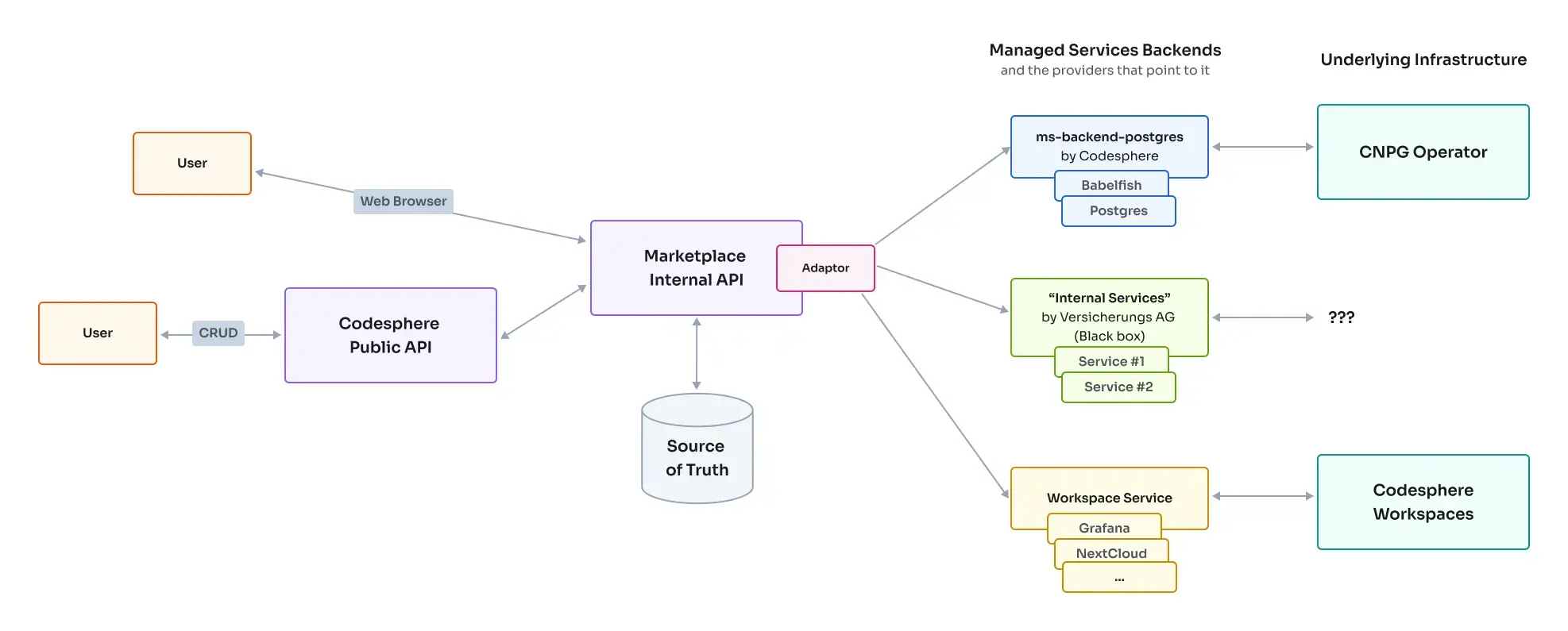
- User Action: A user requests a new service (e.g., "My Custom DB") via the UI or the API.
- Marketplace Internal API: Codesphere stores the desired state for this service (Plan, Config, Secrets) in its database.
- Managed Service Backends: Codesphere reconciles your backend with the desired state of a service via a polling mechanism. On request, your backend returns the current status (e.g., connection strings, health state) which Codesphere displays to the user.
- Underlying Infrastructure: Your backend receives the request and performs the necessary actions (e.g., calls an AWS API, starts a Kubernetes Pod, executes a script).
The API Contract
To integrate with Codesphere, your backend must implement the following REST endpoints. All Service IDs are UUIDs generated by Codesphere.
1. Create Service (POST /)
Codesphere calls this endpoint when a new service is requested.
- Method:
POST - Body: A complete object containing
id,plan,config, andsecrets. - Response:
201 Created(Empty body) or error.
// Request Body Example
{
  "id": "a0eebc99-9c0b-4ef8-bb6d-6bb9bd380a11",
  "plan": {
    "parameters": { "storage": 1000 }
  },
  "config": {
    "version": "14.2",
    "myCustomParameter": "value"
  },
  "secrets": {
    "password": "super-secret-password"
  }
}
2. Update Service (PATCH /{id})
Codesphere calls this endpoint when a user changes the configuration, scales the plan, rotates secrets, or detects a drift between the reported status of a service and the desired state.
- Method:
PATCH - Path Parameter:
id(UUID) - Body: A partial object containing only the fields that need to be updated.
- Response:
204 No Contentor error.
// Request Body Example
{
  "plan": {
    "parameters": { "storage": 2000 }
  }
}
3. Get Status (GET /?id=...)
Codesphere periodically polls this endpoint to sync the status of services. This serves both as a "List" and "Get Details" operation.
- Method:
GET - Query Parameter:
id(Repeatable. E.g.,?id=uuid-1&id=uuid-2). If no IDs are provided, return all known service IDs. - Response:
200 OKwith a map of ID to Status objects.
The status object should contain details (read-only information like hostnames, connection strings) which are displayed to the user.
// Response Body Example
{
  "a0eebc99-9c0b-4ef8-bb6d-6bb9bd380a11": {
    "plan": { "parameters": { "storage": 1000 } },
    "config": { "version": "14.2" },
    "details": {
      "hostname": "10.0.0.5",
      "port": 5432,
      "ready": true
    }
  }
}
4. Delete Service (DELETE /{id})
Codesphere calls this when a user deletes the service. Your backend should de-provision the resources and ensure no data persists unless intended.
- Method:
DELETE - Path Parameter:
id(UUID) - Response:
204 No Contentor error.
Example: Postgres Backend
Below is a partial OpenAPI specification for our internal PostgreSQL backend. This demonstrates how we define the config, plan, and details schemas.
openapi: "3.1.0"
info:
  title: Postgres Managed Service Provider
  version: "1.0"

paths:
  /postgres:
    post:
      summary: Create a new postgres service
      requestBody:
        content:
          application/json:
            schema:
              $ref: "#/components/schemas/Postgres"
      responses:
        201:
          description: Postgres service created

    get:
      summary: Get status of postgres services.
      parameters:
        - name: id
          in: query
          schema:
            type: array
            items:
              type: string
              format: uuid
      responses:
        200:
          content:
            application/json:
              schema:
                oneOf:
                  - type: array # List all IDs if no query param
                    items:
                      type: string
                      format: uuid
                  - type: array # List status if query param provided
                    items:
                      $ref: "#/components/schemas/PostgresStatus"

  /postgres/{id}:
    delete:
      summary: Delete a postgres service
      responses:
        204:
          description: Postgres service deleted
    patch:
      summary: Update a postgres service
      requestBody:
        content:
          application/json:
            schema:
              $ref: "#/components/schemas/Postgres"
      responses:
        204:
          description: Postgres service updated

components:
  schemas:
    PostgresConfig:
      type: object
      properties:
        version:
          type: string
          enum: ["15.14", "14.19"]
        databaseName:
          type: string

    PostgresPlan:
      type: object
      properties:
        parameters:
          $ref: "#/components/schemas/PostgresPlanParameters"

    PostgresPlanParameters:
      type: object
      properties:
        storage:
          type: integer
          description: Storage size in MB (not MiB)
        cpu:
          type: integer
          description: CPU in tenths
        memory:
          type: integer
          description: Memory in MB (not MiB)

    PostgresDetails:
      type: object
      properties:
        hostname:
          type: string
        dsn:
          type: string
        ready:
          type: boolean

    PostgresStatus:
      type: object
      properties:
        config:
          $ref: "#/components/schemas/PostgresConfig"
        details:
          $ref: "#/components/schemas/PostgresDetails"

    PostgresSecrets:
      type: object
      properties:
        superuserPassword:
          type: string
        userPassword:
          type: string

    Postgres:
      type: object
      properties:
        id:
          type: string
          format: uuid
        config:
          $ref: "#/components/schemas/PostgresConfig"
        plan:
          $ref: "#/components/schemas/PostgresPlan"
        secrets:
          $ref: "#/components/schemas/PostgresSecrets"
Security Considerations
Since your backend will be receiving sensitive data (secrets) and performing critical infrastructure changes, security is paramount.
- Network Isolation: Ideally, your backend should only be accessible from the Codesphere control plane.
- Authentication: Implement a shared secret or token authentication mechanism. Codesphere can be configured to send this token in the
Authorizationheader with every request. - Input Validation: Strictly validate all incoming
configandplanparameters against your schema to prevent injection attacks or invalid states.
Registering the Backend
Once your backend is developed and deployed, you must register it with your Codesphere Private Cloud environment to make it available to users.
This involves updating your installation's config.yaml to include your new service provider definition and backend configuration. Specifically, you will need to modify the managedServices array and the managedServiceBackends section.
For detailed instructions on how to register your backend, please refer to the Managed Service Configuration section in the Private Cloud Installation Guide.