Introduction to Codesphere
Codesphere operates as a unified virtual cloud platform that integrates the development, deployment, and operations stages into a single platform. Unlike toolchains that rely on integrating disparate services, Codesphere creates a consistent definition (the "Landscape") for the application that can be relied on throughout its lifecycle.
Below is a breakdown of the technical workflow from Plan to Monitor.
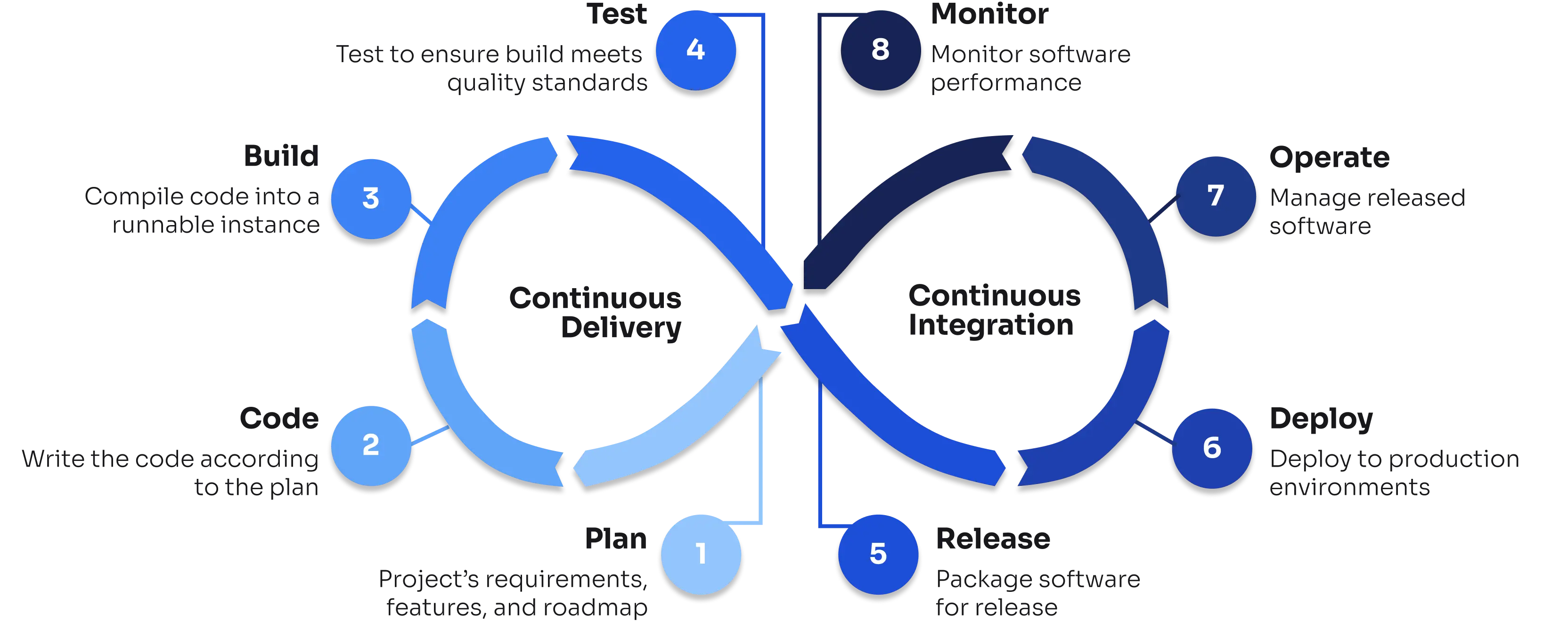
1. Code & Plan Lifecycle Phase: Development & Collaboration
Codesphere provides development tooling into the cloud provider like plattform to ensure environment parity.
- Codesphere’s IDE: The platform provides a browser-based IDE running inside a containerized environment (workspace) that mirrors production. Synchronized terminals, and shared editor states enable concurrent multi-user access to the same workspace.
- Hybrid Access: Developers can interface with the environment using the built-in browser IDE, or connect their local VS Code instances via SSH/Tunneling to utilize local tooling while executing code on the cloud infrastructure.
- Secret Management: Environment variables and secrets are injected securely at runtime. They are not stored in the file system or Git history, preventing accidental exposure.
- Network Isolation: For sensitive use cases, environments can be configured as "Air-Gapped," disabling external internet access to ensure strict data sovereignty.
2. Build Lifecycle Phase: Continuous Integration
The build phase supports both native construction within the Landscape and the integration of pre-existing artifacts.
- Integrated Pipelines: Build and deploy stages are defined via a
ci.ymlconfiguration file. The system can integrate with external triggers from GitHub, GitLab, or Bitbucket. - External Artifacts & Helm: To accommodate existing toolchains, the platform supports deploying pre-built container images and importing standard Helm charts. This allows teams to bring established artifacts and configurations without rewriting logic.
- Compliance & Scanning: The build pipeline runs in each workspace’s environment. It can be configured to execute automated vulnerability scans and regression checks before merging code or generating deployment artifacts.
3. Test Lifecycle Phase: Verification
Testing is integrated into the pull request workflow to prevent regression in production.
- Ephemeral Preview Environments: When a Pull Request is opened, the platform automatically provisions a temporary, isolated Landscape (a "Preview Deployment"). This environment runs the exact version of the code in the PR.
- Production Parity: These test environments share the same architecture definition as production. This allows for accurate manual QA and automated integration testing.
4. Release & Deploy Lifecycle Phase: Continuous Delivery
Deploying is unified in a single workflow, unifying diverse hosting standards. It enables the composition of complex applications by combining various runtime artifacts with managed services into a Landscape.
- Deployment Strategies: The platform supports advanced release patterns such as Blue-Green deployments (switching traffic between two active environments) and Canary releases (gradual traffic shifting) to minimize downtime.
- Service Provisioning: Infrastructure components such as databases (PostgreSQL, MongoDB, Redis) and message brokers (RabbitMQ) are provisioned as managed services directly within the Landscape. This also extends to GPU-enabled instances for AI/ML model training.
- Dynamic Scaling: The runtime supports "Off- when unused" for stateless and stateful applications. Inactive workloads can be suspended to free up resources and instantly reactivated upon incoming traffic (Cold Start).
- Infrastructure Abstraction: Workloads are decoupled from the hardware. Users can deploy standard Docker containers or full Virtual Machines using nested virtualization without managing the underlying Kubernetes or hypervisor layers.
- Traffic Management: Networking features include custom domain management, automated TLS termination, and VPN connectivity. Routing rules can be configured at the port, service, or domain level.
5. Operate Lifecycle Phase: Infrastructure Management
Operational complexity is handled through managed services and automated security policies.
- WIP
6. Monitor Lifecycle Phase: Observability
Observability is built into the runtime, removing the requirement for third-party agents.
- Resource Metrics: Integrated dashboards provide real-time visibility into CPU, Memory, and Storage consumption.
- Cost Analysis: Resource usage is tracked over time to provide granular cost breakdowns per Landscape or Team.
- Open Standards: The platform utilizes OpenTelemetry to aggregate and export logs, metrics, and traces, ensuring compatibility with a wide range of analysis tools.
7. Operations Management System (OMS): Self-Hosted & On-Premise
For organizations with specific infrastructure requirements, the platform offers an Operations Management System (OMS) that allows customers to install and operate their own instances of the platform on arbitrary infrastructure.
- Infrastructure Agnosticism: The platform can be deployed on-premise or across any cloud provider, giving teams full control over where their "Landscapes" run.
- Network Isolation: For sensitive use cases, environments can be configured as "Air-Gapped," disabling external internet access to ensure strict data sovereignty and compliance with internal security policies.
- Centralized Control: The OMS provides a unified control plane to manage these distributed installations, maintaining the same developer experience and workflow consistencies regardless of the underlying hardware.