Restricting Domain Access
Access to applications and services can be restricted at the domain or the application and service level. This guide details the methods available for limiting public access to your workloads on Codesphere.
Using Platform Built-In Restrictions
Codesphere provides built-in platform features to control access at the infrastructure level, including team-based authentication, dev domain privacy, and port-level access control.
Restrict Custom Domains to Team
The Restrict to Team feature enforces authentication at the domain level. When enabled, only users who are logged into Codesphere and are members of the associated Team can access the application URL.
To restrict a custom domain to team members:
- Navigate to the Domains tab in the Team Dashboard
- Locate the domain or subdomain to configure
- Click the Settings (gear icon) next to the domain
- Go to the Routing tab
- Toggle the Domain Access switch to Private
- Click Save changes
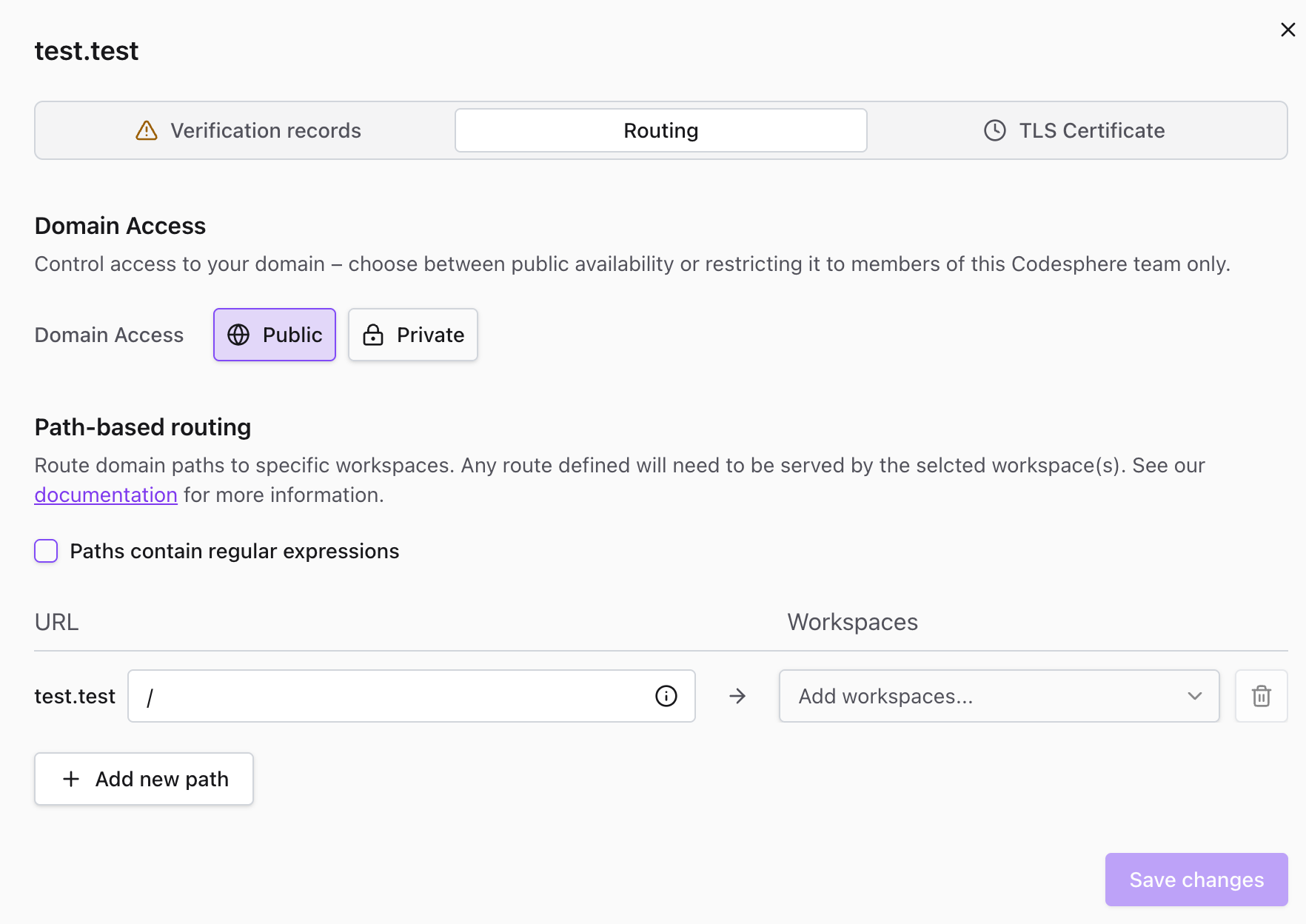
When active, all HTTP requests to the domain are intercepted. Unauthenticated visitors are redirected to the Codesphere login page. Access is granted only upon successful authentication with a valid team member account.
Learn more about adding and configuring custom domains in the Connecting Custom Domain guide.
Restricting Dev Domains
Dev domains are automatically generated URLs that Codesphere assigns to each workspace (e.g., your-workspace.[instance-url]).
To restrict access to a dev domain:
- Navigate to your workspace settings
- Open the Edit Workspace dialog
- Set the workspace visibility to Private
Once private, the dev domain will only be accessible to team members who are signed in to their Codesphere account.
Accessing Restricted Domains
When a domain is set to restricted (private), only members of your team can access the content hosted there. Users have two authentication options:
Option 1: Browser Sign-In
Team members can access restricted domains by signing in to their Codesphere account in their browser. Once authenticated, they'll have access to all restricted domains associated with their team.
Option 2: API Key Authentication
For programmatic access or API calls, users can authenticate using their API key.
To use API key authentication:
Include the API key in the request header:
x-cs-authorization: Bearer [YOUR-API-KEY]
Example using curl:
curl -H "x-cs-authorization: Bearer YOUR-API-KEY" https://your-restricted-domain.com
You can generate and manage your API keys in your Codesphere user settings under the API Keys section.
Configuring Port-Level Access
By default, services do not expose ports publicly. Services that do not require public internet access (e.g., databases, worker nodes) can exclusively use Internal Ports for secure communication inside the landscape. The preferred way of exposing services publicly is by linking an internal port to the path router. The ability to directly expose public workspace subdomains for ports is there to ensure compatibility for more traditional frameworks.
To configure port access:
- Open the CI & Deploy tab and navigate to the Landscape Config Editor
- Click Settings (gear icon) for the specific service
- Navigate to the Ports & Routes section
- Change the port availability setting from Internal to Public
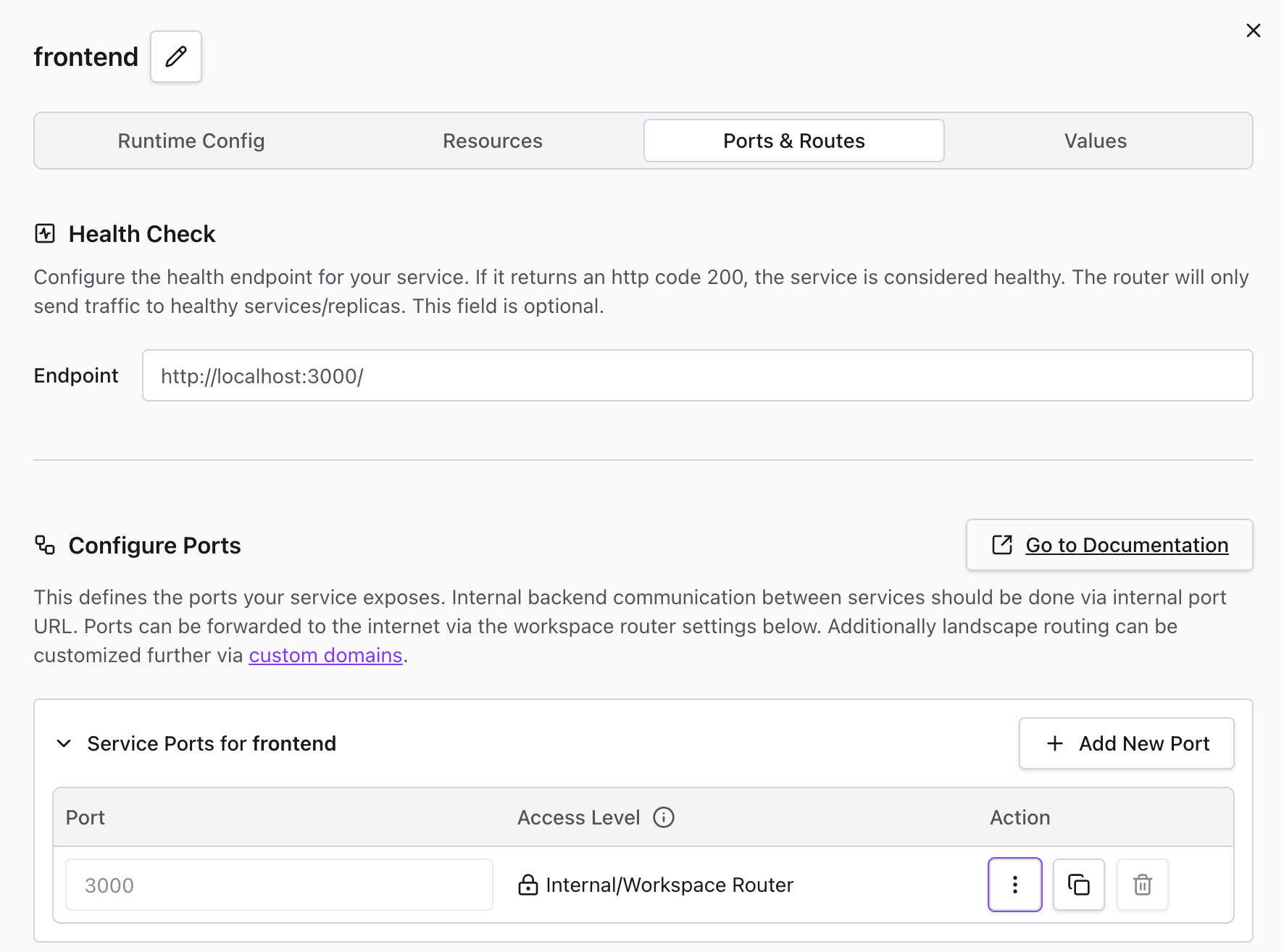
Internal ports eliminate the public URL. The service remains accessible to other services within the same workspace via the internal hostname: http://ws-server-<ws-id>-<service-name>:<port>.
Application-Level Restrictions
For access control requirements not covered by platform settings—such as IP whitelisting or custom authentication for non-Codesphere users—restrictions must be implemented via application middleware.
Common Application-Level Patterns
- IP Whitelisting: Implement middleware (e.g.,
express-ipfilterfor Node.js) to validate theX-Forwarded-Forheader and reject requests from unauthorized IP addresses - Basic Auth: Use a library (e.g.,
express-basic-authfor Node.js) to require a username and password defined within the application environment - Custom OAuth/SSO: Integrate third-party authentication providers for external user access
Implementing security at the code level allows for granular restrictions, such as protecting specific API routes while leaving static assets public.
Use Cases
Access restrictions are particularly useful for:
- Staging environments - Prevent public access to testing and QA environments
- Internal tools - Restrict access to admin panels and internal dashboards
- Development workspaces - Keep work-in-progress applications private
- Database services - Use internal ports to prevent direct external access
- Compliance requirements - Meet security policies that require access control