Runtimes
Runtimes are the execution environments in which your application services run within a Codesphere Landscape. Each service in your falls under one of these runtime types, each optimized for different workload patterns and deployment requirements.
Overview of Runtime Types
Codesphere supports multiple runtime types to accommodate different application architectures and deployment scenarios:
| Runtime Type | Best For | Key Features |
|---|---|---|
| Codesphere Reactives | Web services, APIs, microservices, stateful applications coming from traditional server environments | Managed Ubuntu, default filesystem mount, off-when-unused (can be described as stateful serverless), auto-restarts, shared base image |
| Managed Containers | Custom container images, specific base OS requirements, open source projects, externally built dependencies | Same platform orchestration as Reactives but with your own image, connects to all platform features |
| Cloud Native Deployments | Complex Kubernetes workloads (i.e. helm), experienced users | Full kubectl access, virtual managed cluster, some platform integrations need to be configured manually |
| Virtual Machines (early access) | Legacy applications, OS-level requirements, Windows workloads | Spin up KubeVirt-based VMs alongside Reactives and Managed Containers, routing and networking platform features can be connected |
| Managed Services | Databases, message queues, caches | Pre-configured services from the marketplace that can be deployed and connected to your landscape |
For many modern web applications and APIs, Codesphere Reactives provide the best balance of simplicity, performance, and cost efficiency. Use Managed Containers when you need specific base images or have existing Dockerfiles, and Cloud Native Deployments when you require full Kubernetes control.
Codesphere Reactives
Codesphere Reactives are a runtime environment that lets you define your application environment using standard bash commands—exactly as you would on a local machine or VM—while the platform handles all infrastructure management automatically. You get the freedom of imperative Linux configuration without building, managing, or thinking about containers. The runtime combines the power of traditional server environments with automatic scaling and minimal infrastructure overhead when not running.
→ Read the complete Codesphere Reactives guide
What Makes Reactives Different
Unlike traditional serverless platforms that are stateless and limited to short-lived function executions, or traditional VMs that consume resources continuously, Codesphere Reactives combine benefits from both:
- Stateful execution: Full access to a shared network filesystem for persistent data
- Off-when-unused: Automatic resource deallocation during idle periods
- Automatic fast restarts: Optimized cold-start times
- Long-running processes: Support for traditional web servers, background workers, and complex applications
- Environment control & security: Rootless containers with customizable dependencies via Nix or traditional package managers
Architecture & How It Works
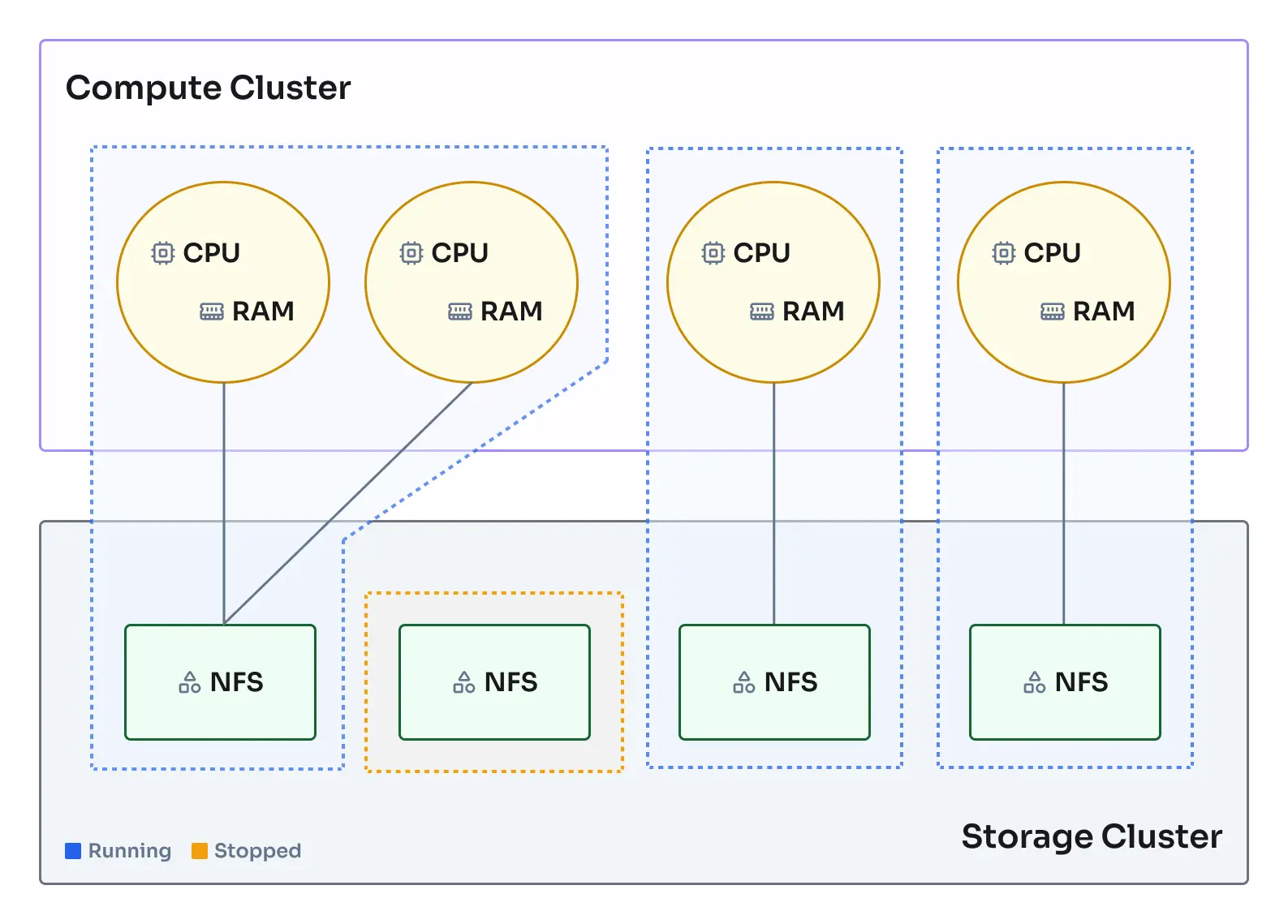
Codesphere Reactives are fully functional Ubuntu open standard containers orchestrated using our patented deployment orchestration for improved startup performance:
- Shared Network Filesystem: Each Reactive has access to a high-performance network filesystem that provides persistent storage across restarts and replicas. Files in
/home/user/appare preserved, while other locations use ephemeral storage. - Serverless Resource Management: Pooled compute instances across multiple nodes enable instant startup and automatic resource deallocation during idle periods. Unused resources are immediately available to other workloads, and wakeup logic restarts services on-demand.
- Kubernetes-Based Orchestration: Built on Kubernetes with health monitoring, load balancing, auto-scaling, and graceful shutdowns — all managed by the platform without requiring any Kubernetes knowledge.
Reactives vs Managed Containers
Both Codesphere Reactives and Managed Containers use the same underlying orchestration platform, but differ in how the base container image is managed:
Codesphere Reactives use a shared, Codesphere-maintained base image that is:
- Pooled and pre-warmed: Instances are kept ready in the pool for near-instant startup (milliseconds)
- Standardized: Maintained and updated by Codesphere for security and compatibility
- Agent-injected: The Codesphere agent is dynamically injected at runtime for orchestration, monitoring, and platform integration
- Customizable at runtime: You define dependencies via Nix or package managers in the
preparestage
Managed Containers allow you to define your own base image which means:
- Custom base OS: Use any Docker image from registries or your own builds
- Pre-baked dependencies: Bundle all dependencies directly into your image via Dockerfile
- Same platform features: Still get orchestration, monitoring, networking, and all Codesphere features
- Slightly slower startup: Container images must be pulled and initialized (typically seconds vs milliseconds)
- Platform integration: The Codesphere agent is integrated for platform features
Both runtime types benefit from:
- Pooled compute resources
- Shared network filesystem access
- Off-when-unused capabilities
- Automatic load balancing and scaling
- Integrated monitoring and observability
Lifecycle Management
Off-When-Unused Behavior
One of the most powerful features of Reactives is their ability to scale to zero:
- Active State: When handling requests or executing code, Reactives consume their allocated compute resources
- Idle Detection: After a period of inactivity (no requests, no active processes), the orchestrator begins shutdown
- Resource Release: Compute resources are returned to the pool, but the filesystem state remains intact
- Instant Wake-Up: On the next incoming request, the Reactive restarts (typically in milliseconds, though actual availability depends on what happens in the run stage) and resumes exactly where it left off
This behavior is ideal for:
- Development and staging environments
- Low-traffic production services
- Scheduled batch jobs
- Cost-sensitive workloads
Scaling Strategies
Reactives support both horizontal and vertical scaling:
Horizontal Scaling (Replicas)
- Add multiple instances (replicas) of the same service
- Automatic load balancing across all healthy replicas
- Configure via
replicasfield inci.ymlor through the UI - Ideal for handling increased request volume
Vertical Scaling (Resources)
- Increase CPU cores or memory allocation
- Takes effect in seconds without restarting
- Configure via
planfield specifying resource tier - Ideal for compute-intensive or memory-intensive workloads
Example scaling configuration:
run:
  api-server:
    plan: 42  # Resource tier (determines CPU/memory)
    replicas: 3  # Number of instances
    steps:
      - name: Start Server
        command: node server.js
Configuration & Setup
Basic Reactive Configuration
Every Reactive service is defined in the run section of your ci.yml:
run:
  my-service:
    # Resource allocation
    plan: 21  # Compute tier - see pricing page for details

    # Environment variables
    env:
      NODE_ENV: production
      DATABASE_URL: VAULT_DB_URL  # Reference secrets from vault

    # Networking
    network:
      ports:
        - port: 3000
          isPublic: false  # Only accessible internally and via router (usually there is no need to expose ports directly)
      paths:
        - port: 3000
          path: /api  # Requests to /api/* route here

    # Startup commands
    steps:
      - name: Start Application
        command: npm start
Environment Preparation
The prepare section defines how to set up your runtime environment:
prepare:
  steps:
    - name: Install System Dependencies
      command: |
        nix-env -iA nixpkgs.nodejs_20 nixpkgs.python311

    - name: Install Application Dependencies
      command: npm ci

    - name: Build Application
      command: npm run build
Codesphere provides Nix package manager for declarative, reproducible environment setup. This ensures your runtime environment is identical across development, staging, and production.
Advanced Configuration Options
Custom Health Checks
run:
  my-service:
    steps:
      - name: Start Application
        command: npm start
    healthEndpoint: http://localhost:8080/health
    network:
      ports:
        - port: 8080
          isPublic: false
Volume Mounts
By default, all services mount the entire /home/user/app directory. You can restrict a service to only mount a subdirectory using mountSubPath:
run:
  my-service:
    mountSubPath: uploads  # Only mounts /home/user/app/uploads
    steps:
      - name: Start Application
        command: npm start
Best Practices & Patterns
Multi-Service Architecture
Services inside the landscape can use the non public ports to make http calls from one service to another. The preferred way to route outside traffic to your landscape services is by mapping a private port to a public path. Making a port public exposes an additional subdomain for that port (in the format <ws-id>-<port>-<service-name>.<dc-base-domain>), often however this is not needed and less secure than going via the router.
run:
  frontend:
    plan: 21
    network:
      paths:
        - port: 3000
          path: /
    steps:
      - command: npm run start:frontend

  backend:
    plan: 21
    network:
      ports:
        - port: 8080
          isPublic: false  # Internal port but forwarded to public path
      paths:
        - port: 8080
          path: /api
    steps:
      - command: npm run start:backend

  worker:
    plan: 21
    network:
      ports:
        - port: 3000
          isPublic: false  # Internal only, no public routes defined
    steps:
      - command: npm run start:worker
Common Pitfalls
| Issue | Cause | Solution |
|---|---|---|
| Data loss on restart | Writing outside /home/user/app | Ensure all persistent writes target the app directory |
| Concurrent write conflicts | Multiple replicas writing same files | Use separate directories per replica or external databases |
| Slow cold starts | Large dependency trees | Optimize prepare stage, lazy-load non-critical modules |
| Health check failures | Application not ready before timeout | Ensure the right port is used and verify if application is returning valid http by curling the internal port url (can be copied from the service flyout) |
| OOM errors | Undersized plan | Monitor memory usage and upgrade plan accordingly |
Security
Rootless Containers
Reactives run as non-root users, providing an additional security layer. This means:
- No access to privileged ports (< 1024) directly
- Cannot install system-level packages that require root permissions
- Limited filesystem permissions outside
/home/user/app
Secret Management
Always use the vault to store sensitive information:
run:
  api:
    env:
      # Use template syntax to reference secrets
      SECRET_KEY: ${{ vault.secretFoo }}
      DB_PASSWORD: ${{ vault.secretBar }}
For detailed information on managing secrets, see Secret Management.
This overview covers the essentials of Codesphere Reactives. For comprehensive guides on configuration patterns, advanced features, troubleshooting, and real-world examples, see the complete Codesphere Reactives documentation.
Managed Containers
Managed Containers allow you to bring your own Docker images to Codesphere while leveraging the platform's orchestration, networking, and monitoring capabilities. Therefore all points and best practices mentioned before for Reactives also apply to the Managed Container Runtime.
→ Read the complete Managed Containers guide
When to Use Managed Containers
Use Managed Containers when:
- You have existing Dockerfiles or pre-built images
- You need a specific base image or OS distribution (Alpine, Ubuntu, Debian, etc.)
- Your dependencies are complex and best managed via Dockerfile
- You want to use images from registries like Docker Hub, ECR, or private registries
- You need to bundle system-level packages that aren't available via Nix
Configuration
run:
  nginx-server:
    baseImage: nginx:1.25-alpine
    plan: 21
    steps:
      - command: nginx -g "daemon off;"
    healthEndpoint: http://localhost/
    network:
      ports:
        - port: 80
          isPublic: false
      paths:
        - port: 80
          path: /
    runAsUser: 1000
    runAsGroup: 1000
Managed Containers typically have startup times in the seconds range (vs milliseconds for Reactives) due to image pulling and initialization. Actual speed will depend on the size of the image and network performance from the registry to the cluster.
For comprehensive guides on building custom images, registry configuration, advanced patterns, and troubleshooting, see the complete Managed Containers documentation.
Cloud Native Deployments
Cloud Native Deployments utilize a virtual managed Kubernetes cluster. Users get full kubectl access for advanced orchestration scenarios.
→ Read the complete Virtual Clusters guide
When to Use Cloud Native
Use Cloud Native Deployments when:
- You need full Kubernetes API access
- You're deploying complex Helm charts
- You require custom Kubernetes resources (CRDs)
- You have existing Kubernetes manifests
Configuration
You can provision the virtual kubernetes cluster in the managed services section of the UI or API. Once the cluster is provisioned you can connect to it using the kubeconfig available in the API and deploy your workloads using kubectl commands in the prepare or run steps or via the terminal.
Deep lifecycle integration into the Codesphere ci.yml is currently work in progress, users can already deploy workloads by adding kubectl commands to the prepare or run steps and using the appropriate context.
This runtime is aimed at experts and should not be used without prior knowledge about Kubernetes.