GitHub Preview Deployments
This guide explains how to automatically create a Preview Codesphere Workspace for every Pull Request (PR) opened in your GitHub repository. This allows your team to review changes in a live environment before merging.
Architectural Overview
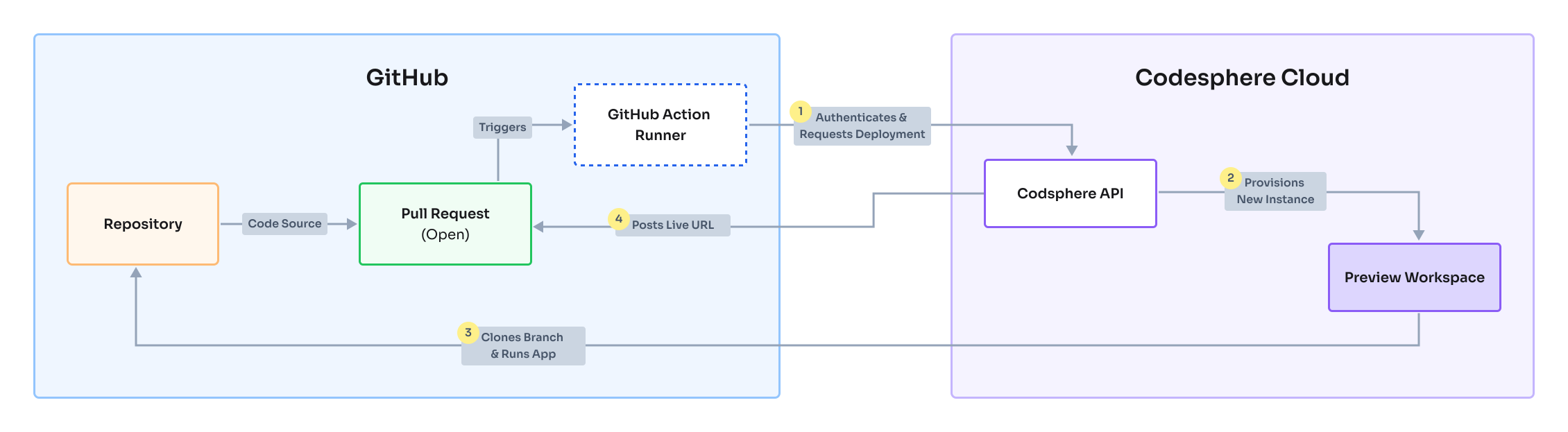
Prerequisites
Before setting up the automation, ensure you have the following ready:
- Codesphere Account
- Admin access to the GitHub repository you wish to connect
We are currently working on a dedicated API Token system. Once released, you will be able to authenticate using tokens instead of account passwords.
Recommended: Use a Service Account
For production environments, we strongly recommend using a Service Account (a dedicated machine user) rather than a personal developer account. This prevents automation from breaking if a team member leaves.
- Create a Service Account: Sign up for a new Codesphere account using a dedicated email alias, e.g.,
devops+ci@yourdomain.com. - Invite to Team: Log into your main Codesphere account and invite this new service account to your target Team.
- Connect Git: Log in as the service account and ensure it has the necessary permissions to access your GitHub repository.
- Set a Password: Since you cannot use OAuth for automation, ensure this service account has a password set (use the "Forgot Password" flow if you signed up via GitHub/Google).
GitHub Actions requires a standard email/password login. If your service account was created via OAuth, you must define a password:
- Log out of Codesphere.
- Click Forgot Password on the login screen.
- Follow the email instructions to set a password for the service account.
Configure GitHub Secrets
To allow GitHub Actions to communicate with Codesphere securely, you need to store your credentials as encrypted secrets.
- Open your repository on GitHub.
- Navigate to Settings > Secrets and Variables > Actions.
- Click New repository secret and add the following two secrets:
| Secret Name | Value |
|---|---|
CODESPHERE_EMAIL | Your Codesphere login email address. |
CODESPHERE_PASSWORD | The password you defined in the "Prerequisites" step. |
Add the Workflow File
You need to create a GitHub Actions workflow file that listens for Pull Request events.
- Create the directory
.github/workflows/in your repository root. - Create a file named
main.ymlinside that directory. - Paste the following configuration:
name: Codesphere Preview Deployment

on:
  workflow_dispatch:
  pull_request:
    types: [closed, opened, reopened, synchronize]

permissions:
  contents: read
  pull-requests: read
  deployments: write

jobs:
  deploy:
    name: Deploy to Codesphere
    # Prevent multiple workspaces from being created for the same PR
    concurrency: codesphere-preview-${{ github.event.pull_request.number }}
    runs-on: ubuntu-latest
    steps:
      - name: Checkout Code
        uses: actions/checkout@v4

      - name: Deploy Preview
        uses: codesphere-cloud/gh-action-deploy@main
        env:
          GITHUB_TOKEN: ${{ secrets.GITHUB_TOKEN }}
        with:
          email: ${{ secrets.CODESPHERE_EMAIL }}
          password: ${{ secrets.CODESPHERE_PASSWORD }}
          team: 'My Team'         # <--- REPLACE with your Team Name
          plan: 'Boost'           # Options: Micro, Boost, Pro
          onDemand: 'true'        # 'true' enables cost-saving standby mode
          deploymentLinkType: 'preview' # Options: preview, dev-domain
          apiUrl: 'https://codesphere.com' # Optional: Change for specific regions/instances
          env: |                  # Optional: Add environment variables below
            MY_ENV=test
            DEBUG=true
Make sure to replace 'My Team' with the exact name of your team in Codesphere (case-sensitive). You can find this in the top-left corner of the Codesphere UI.
Configuration Reference
The following inputs are supported by the codesphere-cloud/gh-action-deploy action:
| Option | Required | Description | Default / Values |
|---|---|---|---|
email | Yes | Your Codesphere account email address. | - |
password | Yes | Your Codesphere account password. | - |
team | Yes | The exact name of your Team in Codesphere. | - |
plan | No | The compute plan for the workspace. | Boost Options: Micro, Boost, Pro |
onDemand | No | If true, the workspace uses "Off when unused" mode to save costs (wakes up upon access). | false |
apiUrl | No | The base URL for your Codesphere API. | https://codesphere.com |
env | No | A list of environment variables to inject into the workspace (Key=Value format). | - |
deploymentLinkType | No | Controls the format of the deployment link posted to the PR. preview opens an interactive preview where reviewers can leave frontend comments. dev-domain links directly to the workspace's development domain. | dev-domain |
Use dotenv like environment variables definition. See https://www.npmjs.com/package/dotenv for details.
Deploy & Verify
- Commit and push the
main.ymlfile. - Open a new Pull Request in your repository.
- Check the PR status section.
You will see a "Deploy" check containing a direct link to your preview environment.

When you close or merge the Pull Request, this workflow will automatically shut down and delete the preview workspace to ensure you aren't charged for unused resources.